Description
Brand: MoKo
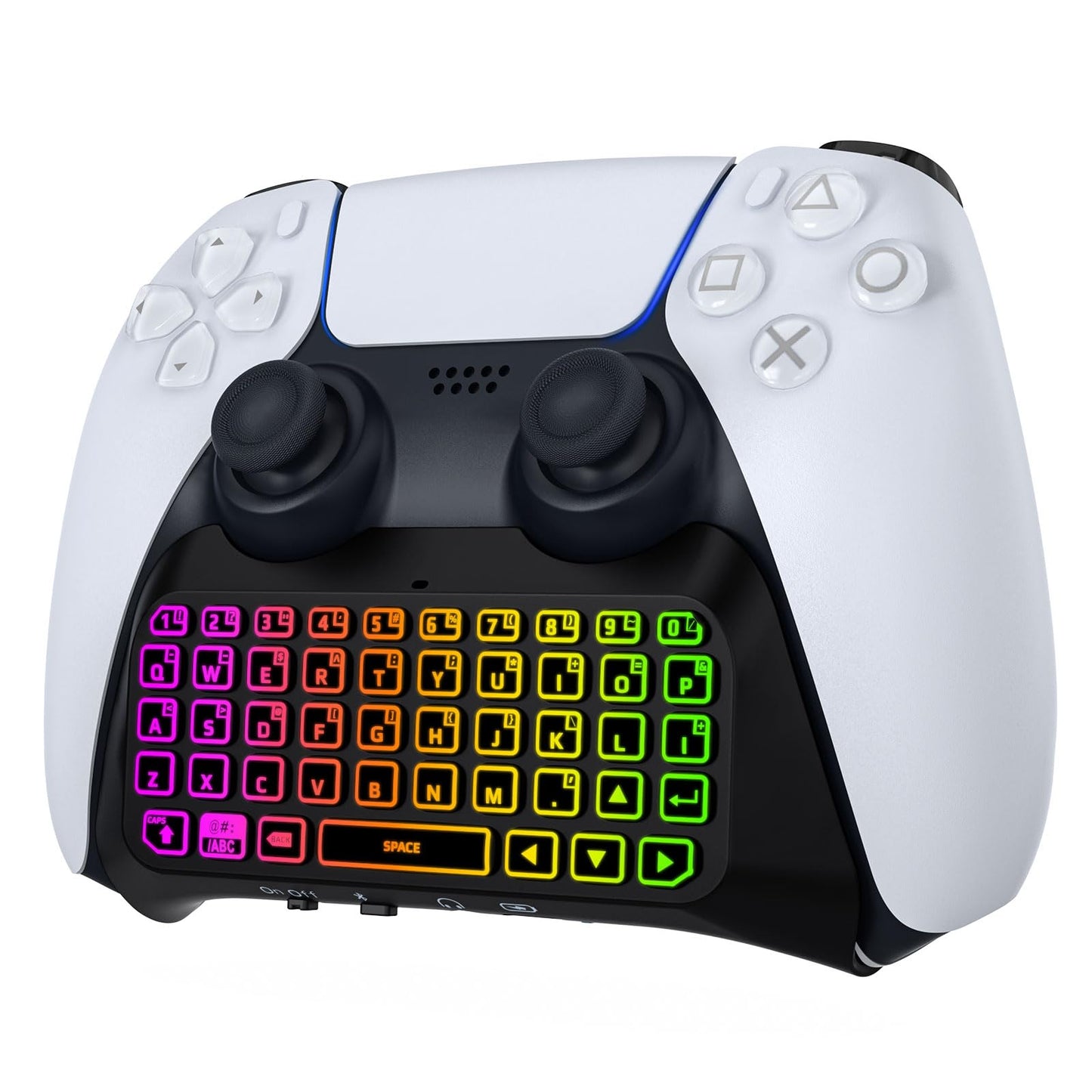
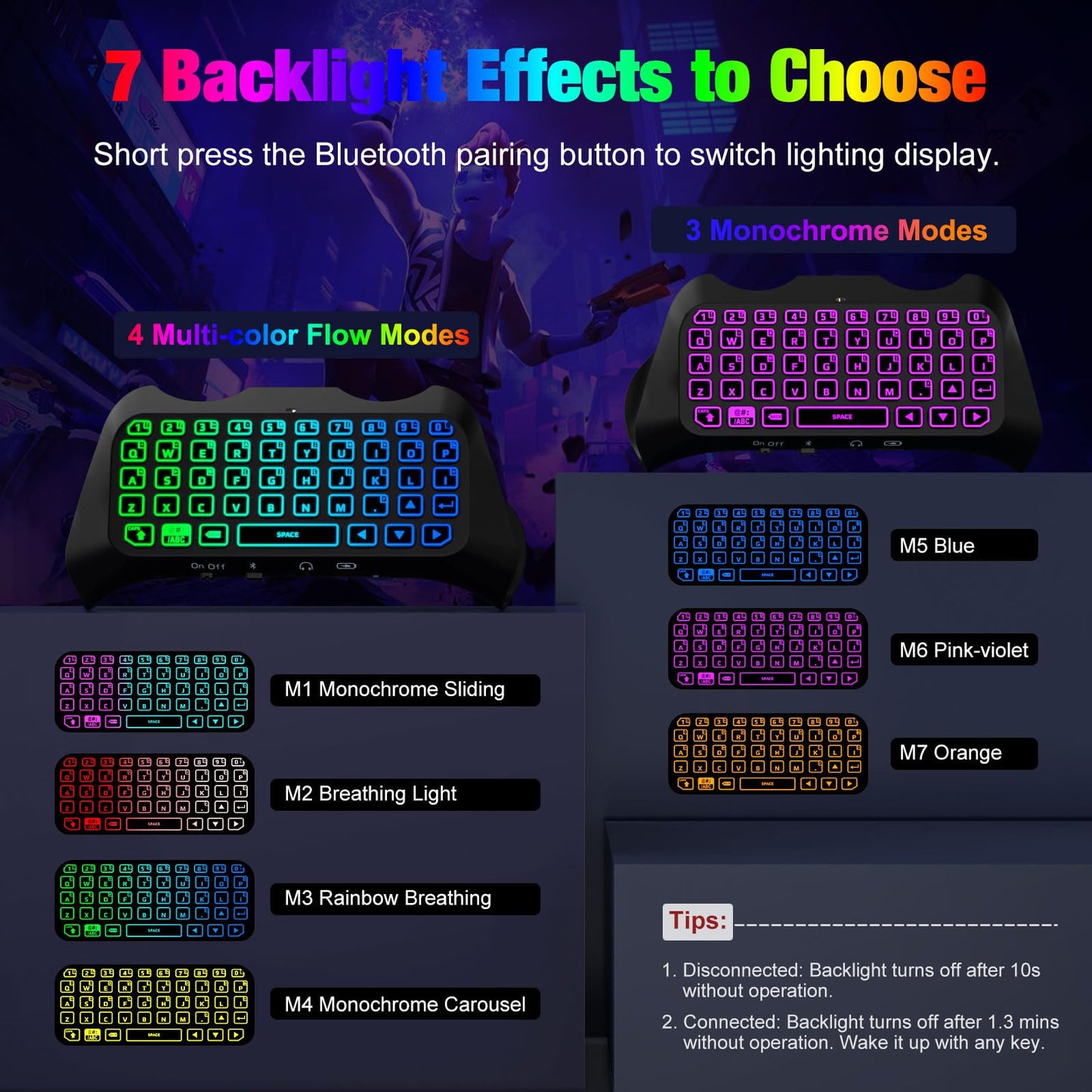
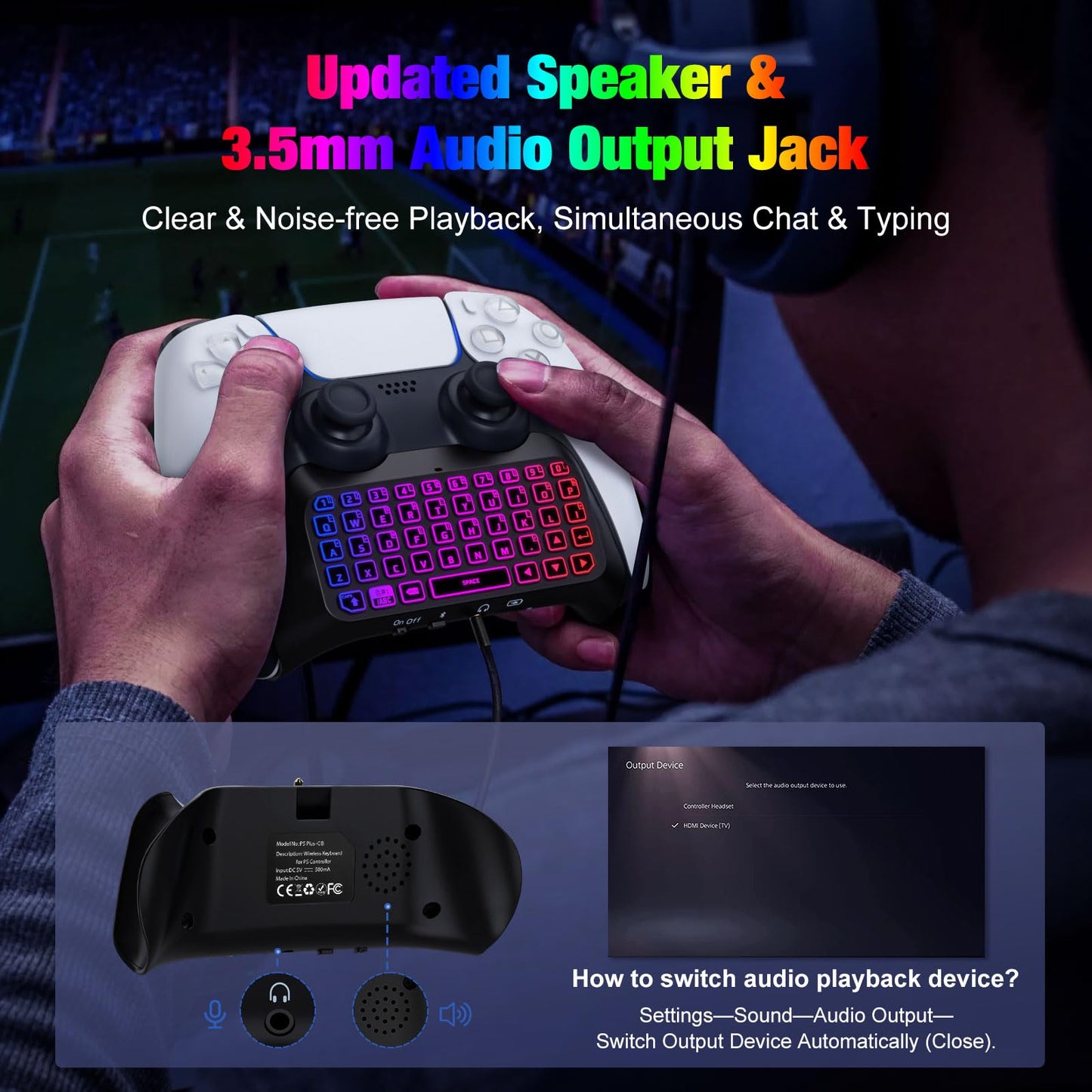
MoKo Keyboard for PS5 Controller with Multi-color Backlights This PS5 controller accessories is designed for official Playstaion 5 controller. 4 Multi-color Lighting Modes Include Monochrome Sliding Mode, Breathing Light Mode, Rainbow Breathing Mode, and Monochrome Auto-rotate Mode, consisting of red, dark blue, green, orange, pink-violet, lake blue, and white lights. 3 Monochrome Lighting Modes Include blue, pink-violet or orange. New-updated Speaker The built-in speaker has no noise even when played at the loudest volume, and can clearly play the game sound. 3.5mm Audio Output Jack The keyboard for PS5 controller allows you to communicate with your teammates conveniently, both online chat with headphones and typing instant messages. How to Change The Backlight Short press the bluetooth pairing key to switch. Disconnect With the Console The backlight illuminates when the keyboard is powered on, and it goes out after 2 seconds. Press any key, the backlight lights up instantly, and the lighting mode remains unchanged. Pressing the pairing key can also switch the lighting mode. Connect With the Console After the keyboard is paired with the console, the backlight is on for 1.5 minutes and then goes out, press any key and the light stays on for another 1.5 minutes. Pairing Steps Settings-Accessories-General-Bluetooth Accessories-Choose the name of the keyboard “P5 Plus Keyboard”-Press the “X” on PS5 Controller to confirm-Secret key will be displayed on the screen-Input it directly with the keyboard-Press Enter Key to confirm-Completion. Package Content 1 x Keyboard Size (L*W*H) 5.04 in/12.80 cm*2.09in/5.30cm*1.30in/3.30cm
• Fantastic Backlight Keyboard: MoKo newly upgraded RGB backlit PS5 keyboard has 7 lighting modes: 4 multicolor modes and 3 monochrome light modes. Specially designed silicone keys help identify each letter easily in the dark. The backlight turns off if there is no operation within 10 seconds, and it restores the previous mode after powering again. Note: Short press the Bluetooth pairing button to switch lighting modes.
• Chat & Type While Playing: The upgraded built-in speaker plays game sounds clearly without noise, allowing you to hear all chat audio from the PS5 controller keyboard. The 3.5mm audio output jack and custom 47 keys of this PS5 keyboard allow you to chat online and type instant messages with your teammates. If you want to switch the audio playback device, please modify the settings in "Output Device": Settings-Sound-Audio Output-Switch Output Device Automatically (Close).
• Perfect for PS5 Controller: MoKo PS5 wireless keyboard is specially designed for the PlayStation 5 controller. Compact and lightweight design will not hinder the operation of the handle or the aesthetics of the controller at all. Built-in 500 mhA batteries can support 80 hours of playback. Please make sure the keyboard is fully charged before using. Note: It is not suitable for PS5 DualSense Edge controller, and *???????????????? ?????????? ???? ?????? ????????????????*.
• Legible Key Indicate: 47-keys PS5 chatpad which is made of silicone material and comfortable to touch, has clear indications and an upgraded white frame design. It can enhance your gaming experience, and reduce gaming fatigue. The back design is attached to the controller grip, allowing flexible operation without blocking the use of other buttons. Note: If the battery level is less than 20%, it may affect the normal use of the PS5 keyboard.
• Bluetooth Connection: Connect the PS5 controller first, then turn on the keyboard. Press and hold the pairing button on the keyboard for about 3 seconds until the blue indicator flashes. Pairing steps: Settings-Accessories-General-Bluetooth Accessories-Choose the name of the keyboard “P5 Plus-CB”-Press the “X” on the PS5 Controller to confirm-Secret key will be displayed on the screen-Input it directly with the keyboard-Press Enter Key to confirm-Completion.
Color: Multi Colors
MoKo Keyboard for PS5 Controller with Multi-color Backlights This PS5 controller accessories is designed for official Playstaion 5 controller. 4 Multi-color Lighting Modes Include Monochrome Sliding Mode, Breathing Light Mode, Rainbow Breathing Mode, and Monochrome Auto-rotate Mode, consisting of red, dark blue, green, orange, pink-violet, lake blue, and white lights. 3 Monochrome Lighting Modes Include blue, pink-violet or orange. New-updated Speaker The built-in speaker has no noise even when played at the loudest volume, and can clearly play the game sound. 3.5mm Audio Output Jack The keyboard for PS5 controller allows you to communicate with your teammates conveniently, both online chat with headphones and typing instant messages. How to Change The Backlight Short press the bluetooth pairing key to switch. Disconnect With the Console The backlight illuminates when the keyboard is powered on, and it goes out after 2 seconds. Press any key, the backlight lights up instantly, and the lighting mode remains unchanged. Pressing the pairing key can also switch the lighting mode. Connect With the Console After the keyboard is paired with the console, the backlight is on for 1.5 minutes and then goes out, press any key and the light stays on for another 1.5 minutes. Pairing Steps Settings-Accessories-General-Bluetooth Accessories-Choose the name of the keyboard “P5 Plus Keyboard”-Press the “X” on PS5 Controller to confirm-Secret key will be displayed on the screen-Input it directly with the keyboard-Press Enter Key to confirm-Completion. Package Content 1 x Keyboard Size (L*W*H) 5.04 in/12.80 cm*2.09in/5.30cm*1.30in/3.30cm
• Fantastic Backlight Keyboard: MoKo newly upgraded RGB backlit PS5 keyboard has 7 lighting modes: 4 multicolor modes and 3 monochrome light modes. Specially designed silicone keys help identify each letter easily in the dark. The backlight turns off if there is no operation within 10 seconds, and it restores the previous mode after powering again. Note: Short press the Bluetooth pairing button to switch lighting modes.
• Chat & Type While Playing: The upgraded built-in speaker plays game sounds clearly without noise, allowing you to hear all chat audio from the PS5 controller keyboard. The 3.5mm audio output jack and custom 47 keys of this PS5 keyboard allow you to chat online and type instant messages with your teammates. If you want to switch the audio playback device, please modify the settings in "Output Device": Settings-Sound-Audio Output-Switch Output Device Automatically (Close).
• Perfect for PS5 Controller: MoKo PS5 wireless keyboard is specially designed for the PlayStation 5 controller. Compact and lightweight design will not hinder the operation of the handle or the aesthetics of the controller at all. Built-in 500 mhA batteries can support 80 hours of playback. Please make sure the keyboard is fully charged before using. Note: It is not suitable for PS5 DualSense Edge controller, and *???????????????? ?????????? ???? ?????? ????????????????*.
• Legible Key Indicate: 47-keys PS5 chatpad which is made of silicone material and comfortable to touch, has clear indications and an upgraded white frame design. It can enhance your gaming experience, and reduce gaming fatigue. The back design is attached to the controller grip, allowing flexible operation without blocking the use of other buttons. Note: If the battery level is less than 20%, it may affect the normal use of the PS5 keyboard.
• Bluetooth Connection: Connect the PS5 controller first, then turn on the keyboard. Press and hold the pairing button on the keyboard for about 3 seconds until the blue indicator flashes. Pairing steps: Settings-Accessories-General-Bluetooth Accessories-Choose the name of the keyboard “P5 Plus-CB”-Press the “X” on the PS5 Controller to confirm-Secret key will be displayed on the screen-Input it directly with the keyboard-Press Enter Key to confirm-Completion.
Color: Multi Colors
Additional Information
Delivery Information
Swift, Secure, and Reliable Shipping
At craftedyogi.com, we understand how important fast and dependable delivery is when it comes to your electronics. Whether it's a gadget, accessory, or device, we are committed to providing a seamless and efficient shipping experience to ensure your electronics arrive safely and on time.
Our Shipping Process
Order Processing
As soon as you place your order, our dedicated team begins processing it promptly to ensure quick dispatch. We aim to ship all electronics within 2 business days of order confirmation, excluding weekends and holidays.
Secure Packaging
Your electronics are valuable, and we treat them with the highest level of care. Each item is carefully packed using high-quality, protective packaging materials to prevent damage during transit. We ensure your products arrive in excellent condition, ready to use.
Shipping Partners
We partner with reputable and trusted shipping carriers to guarantee safe and timely delivery. Once your order ships, you’ll receive a tracking number so you can monitor your package in real time and stay updated on its delivery status.
Transit Time
USA Shipping: 4–7 business days after dispatch.
Shipping Costs
We Offer free shipping for Domestic orders inside USA.
Delivery Support
Our customer support team is here to assist you every step of the way. If you have any questions about your order, shipping timelines, or tracking details, please feel free to contact us:
📧 Email: support@craftedyogi.com
We’re dedicated to ensuring your electronics reach you quickly and securely. Your satisfaction is our top priority.
Thank you for choosing craftedyogi.com for your electronics needs. We look forward to delivering innovation and convenience right to your doorstep. Unbox with confidence and enjoy your new technology!
Reviews
My Wishlist
Wishlist is empty.
Compare
Shopping cart


