Description
Brand: FUERAN
What's the difference between an HDMI dummy plug and the HDMI dummy plug HDR version?<br /> <br /> The main difference between the HDMI dummy plug and the HDMI dummy plug HDR version lies in the range of functions they support and the display specifications they emulate.<br /> <br /> Standard HDMI dummy plug:<br /> Emulates a basic display’s EDID (Extended Display Identification Data), providing fundamental information such as resolution and refresh rate.<br /> Generally does not support advanced features such as HDR or a wider color gamut.<br /> <br /> HDR version HDMI dummy plug:<br /> Emulates more advanced EDID information, including the BT.2020 color gamut, HDR10, or Dolby Vision support flags necessary for HDR.<br /> Can trigger the device to output HDR signals, which is useful for HDR video testing, HDR game streaming, and similar scenarios.<br /> <br /> It typically also supports higher resolutions (such as 4K@60Hz) and newer HDCP versions (like HDCP 2.2) to meet HDR device requirements.<br /> In simple terms, the HDR version dummy plug not only fools the system into thinking a monitor is connected, but also fools it into thinking an HDR-capable monitor is connected, thereby enabling HDR mode. The standard version can only activate basic display modes.<br /> <br /> So, how do you choose between an HDMI dummy plug and an HDR version dummy plug? You can decide based on your specific needs.<br /> <br /> Clarify your needs:<br /> If you just want the device to output a normal resolution (for example, to prevent remote desktop blurriness or to enable GPU acceleration), the standard HDMI dummy plug will suffice.<br /> If your device supports HDR and you need HDR functionality (for instance, for HDR video playback, HDR game streaming, or wide color gamut testing), then the HDR version is recommended.<br /> <br /> Usage scenario comparison:<br /> Standard version: Used for servers, mining rigs, HTPCs, and other scenarios requiring remote access or basic graphical acceleration.<br /> HDR version: Used for media players, high-end HTPCs, video post-production equipment, and other scenarios that require high dynamic range.<br /> <br /> If you’re unsure whether you need HDR, it’s recommended to start with the standard version. If your needs increase in the future, you can always upgrade to the HDR version.<br /> <br /> In summary:<br /> The HDR version is backward compatible, so it can theoretically provide all the functions and effects of the standard version while also adding HDR support. Therefore, for a better experience and better functionality, it’s still recommended to choose based on your specific requirements?Ensure compatibility and prompt experience of features and effects.<br />
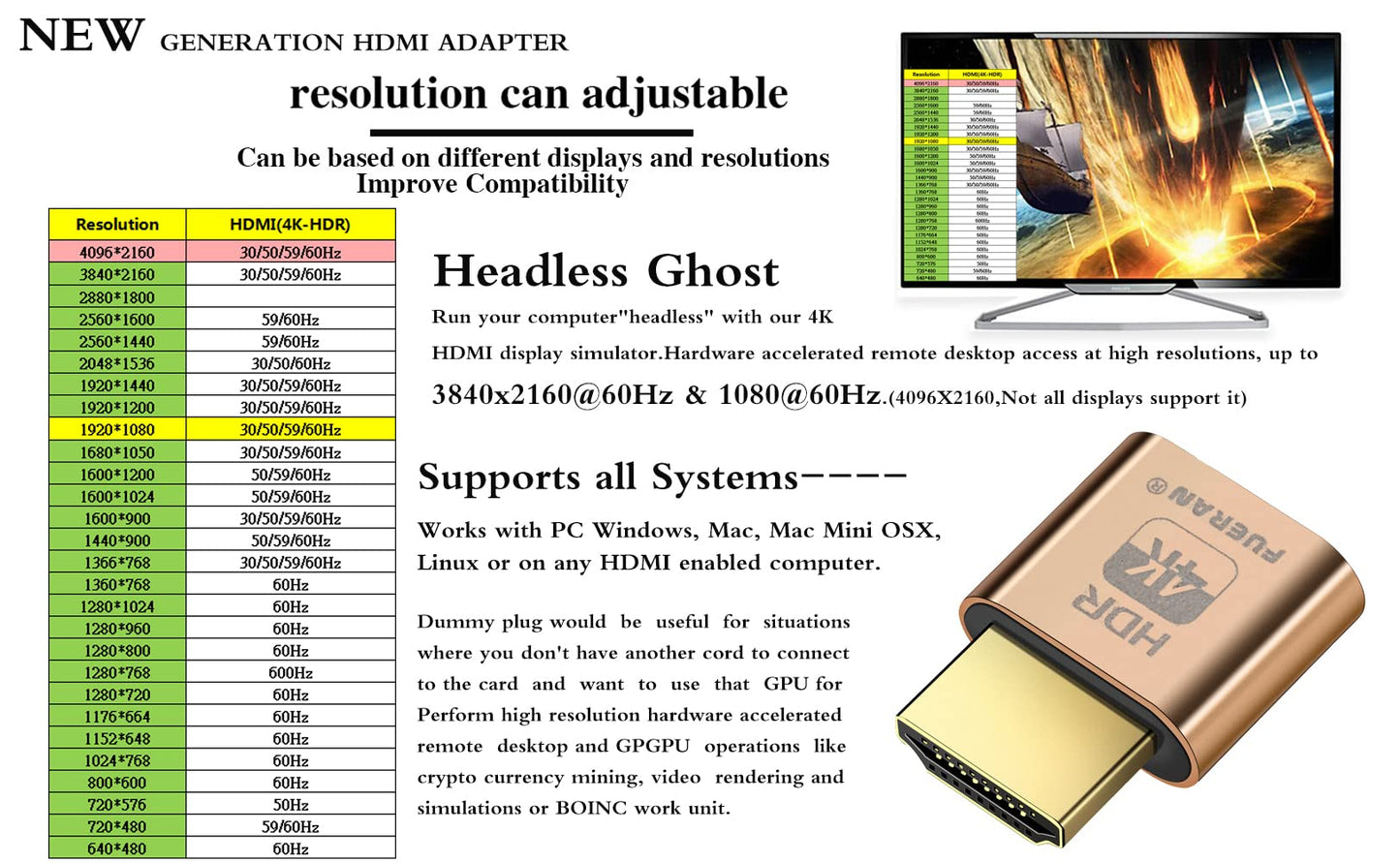
• FUERAN New Generation HDR support HDMI Headless Adapter - Run your computer ‘headless’ with our 4K HDMI display simulator. Hardware accelerated remote desktop access at high resolutions, up to 3840×2160@60Hz & 1080@120Hz.support HDR .
• Create a virtual second screen which does not actually exist. use dummy display so that can "cast" the second (virtual) screen to a chromecast device Works on remote computers without local monitor resolution ratio optional:1024x768@60Hz,1280x800@60Hz,1920x1080@120Hz, 1920x1200@60Hz,3840 x 2160@60Hz
• Plug & Play - No drivers, no software, no power cables or configuration required. Not an HDMI Transmitter/Receiver.NOT SUPPORT THE HDCP!
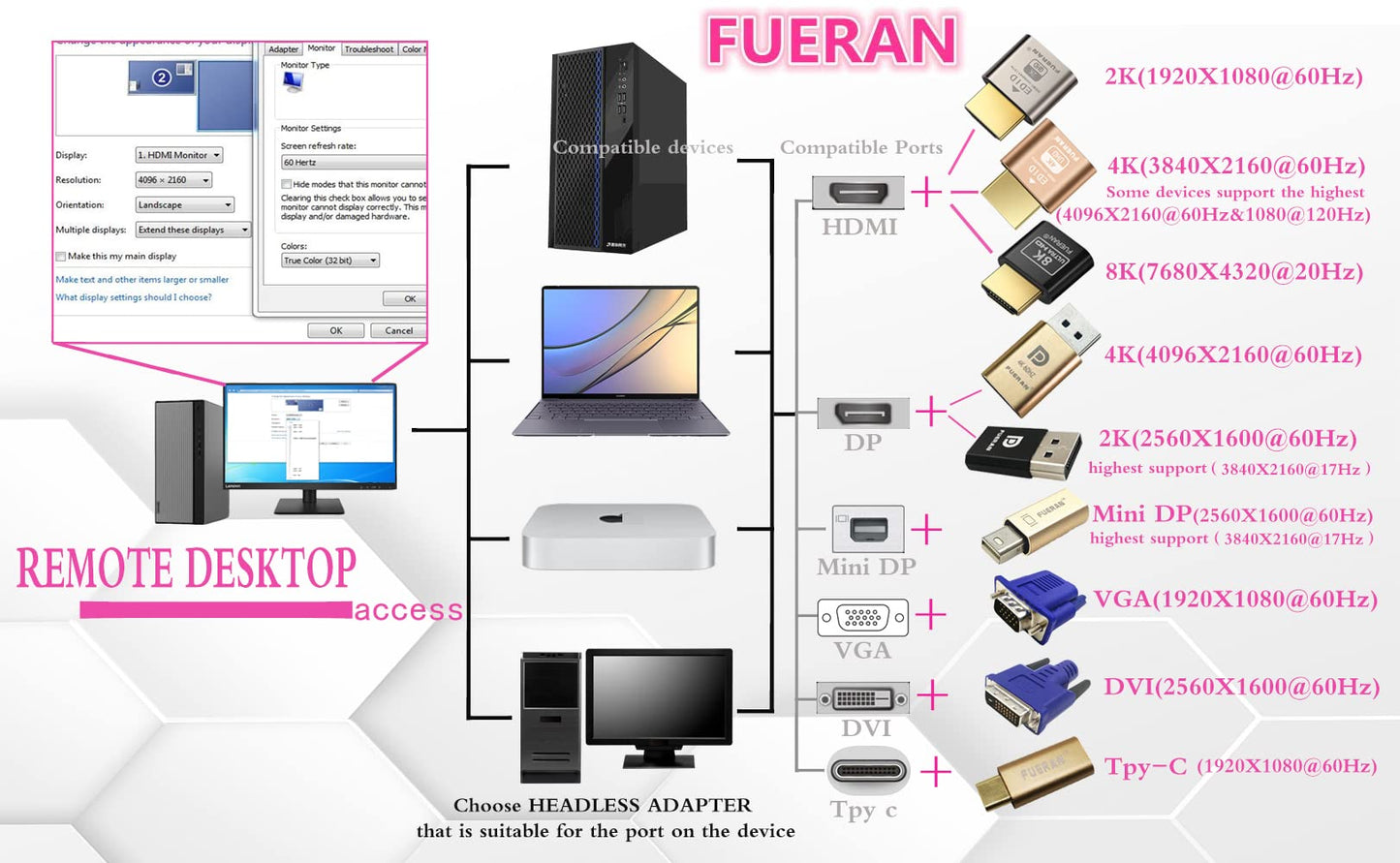
• Dummy plug would be useful for situations where you don't have another cord to connect to the card and want to use that GPU for something like cryptocurrency mining or BOINC work unit crunching - Works with PC Windows, Mac, Mac Mini OSX, Linux or on any HDMI enabled computer. Perform high resolution hardware accelerated remote desktop and GPGPU operations like crypto currency mining, video rendering and simulations.
• Ghost Adapters works MD graphics card "detected" that a monitor was plugged in. real test was connecting with TeamViewer and AnyDesk,Great for headless RaspberryPi. Tricks VNC display so full resolution. Easier than software solutions and stable.
Model: FUERAN-4K
Color: 4K-1080@120-3840x2160@60 HDR
What's the difference between an HDMI dummy plug and the HDMI dummy plug HDR version?<br /> <br /> The main difference between the HDMI dummy plug and the HDMI dummy plug HDR version lies in the range of functions they support and the display specifications they emulate.<br /> <br /> Standard HDMI dummy plug:<br /> Emulates a basic display’s EDID (Extended Display Identification Data), providing fundamental information such as resolution and refresh rate.<br /> Generally does not support advanced features such as HDR or a wider color gamut.<br /> <br /> HDR version HDMI dummy plug:<br /> Emulates more advanced EDID information, including the BT.2020 color gamut, HDR10, or Dolby Vision support flags necessary for HDR.<br /> Can trigger the device to output HDR signals, which is useful for HDR video testing, HDR game streaming, and similar scenarios.<br /> <br /> It typically also supports higher resolutions (such as 4K@60Hz) and newer HDCP versions (like HDCP 2.2) to meet HDR device requirements.<br /> In simple terms, the HDR version dummy plug not only fools the system into thinking a monitor is connected, but also fools it into thinking an HDR-capable monitor is connected, thereby enabling HDR mode. The standard version can only activate basic display modes.<br /> <br /> So, how do you choose between an HDMI dummy plug and an HDR version dummy plug? You can decide based on your specific needs.<br /> <br /> Clarify your needs:<br /> If you just want the device to output a normal resolution (for example, to prevent remote desktop blurriness or to enable GPU acceleration), the standard HDMI dummy plug will suffice.<br /> If your device supports HDR and you need HDR functionality (for instance, for HDR video playback, HDR game streaming, or wide color gamut testing), then the HDR version is recommended.<br /> <br /> Usage scenario comparison:<br /> Standard version: Used for servers, mining rigs, HTPCs, and other scenarios requiring remote access or basic graphical acceleration.<br /> HDR version: Used for media players, high-end HTPCs, video post-production equipment, and other scenarios that require high dynamic range.<br /> <br /> If you’re unsure whether you need HDR, it’s recommended to start with the standard version. If your needs increase in the future, you can always upgrade to the HDR version.<br /> <br /> In summary:<br /> The HDR version is backward compatible, so it can theoretically provide all the functions and effects of the standard version while also adding HDR support. Therefore, for a better experience and better functionality, it’s still recommended to choose based on your specific requirements?Ensure compatibility and prompt experience of features and effects.<br />
• FUERAN New Generation HDR support HDMI Headless Adapter - Run your computer ‘headless’ with our 4K HDMI display simulator. Hardware accelerated remote desktop access at high resolutions, up to 3840×2160@60Hz & 1080@120Hz.support HDR .
• Create a virtual second screen which does not actually exist. use dummy display so that can "cast" the second (virtual) screen to a chromecast device Works on remote computers without local monitor resolution ratio optional:1024x768@60Hz,1280x800@60Hz,1920x1080@120Hz, 1920x1200@60Hz,3840 x 2160@60Hz
• Plug & Play - No drivers, no software, no power cables or configuration required. Not an HDMI Transmitter/Receiver.NOT SUPPORT THE HDCP!
• Dummy plug would be useful for situations where you don't have another cord to connect to the card and want to use that GPU for something like cryptocurrency mining or BOINC work unit crunching - Works with PC Windows, Mac, Mac Mini OSX, Linux or on any HDMI enabled computer. Perform high resolution hardware accelerated remote desktop and GPGPU operations like crypto currency mining, video rendering and simulations.
• Ghost Adapters works MD graphics card "detected" that a monitor was plugged in. real test was connecting with TeamViewer and AnyDesk,Great for headless RaspberryPi. Tricks VNC display so full resolution. Easier than software solutions and stable.
Model: FUERAN-4K
Color: 4K-1080@120-3840x2160@60 HDR
Additional Information
Delivery Information
Swift, Secure, and Reliable Shipping
At craftedyogi.com, we understand how important fast and dependable delivery is when it comes to your electronics. Whether it's a gadget, accessory, or device, we are committed to providing a seamless and efficient shipping experience to ensure your electronics arrive safely and on time.
Our Shipping Process
Order Processing
As soon as you place your order, our dedicated team begins processing it promptly to ensure quick dispatch. We aim to ship all electronics within 2 business days of order confirmation, excluding weekends and holidays.
Secure Packaging
Your electronics are valuable, and we treat them with the highest level of care. Each item is carefully packed using high-quality, protective packaging materials to prevent damage during transit. We ensure your products arrive in excellent condition, ready to use.
Shipping Partners
We partner with reputable and trusted shipping carriers to guarantee safe and timely delivery. Once your order ships, you’ll receive a tracking number so you can monitor your package in real time and stay updated on its delivery status.
Transit Time
USA Shipping: 4–7 business days after dispatch.
Shipping Costs
We Offer free shipping for Domestic orders inside USA.
Delivery Support
Our customer support team is here to assist you every step of the way. If you have any questions about your order, shipping timelines, or tracking details, please feel free to contact us:
📧 Email: support@craftedyogi.com
We’re dedicated to ensuring your electronics reach you quickly and securely. Your satisfaction is our top priority.
Thank you for choosing craftedyogi.com for your electronics needs. We look forward to delivering innovation and convenience right to your doorstep. Unbox with confidence and enjoy your new technology!
Reviews
My Wishlist
Wishlist is empty.
Compare
Shopping cart


