Description
Brand: Generic
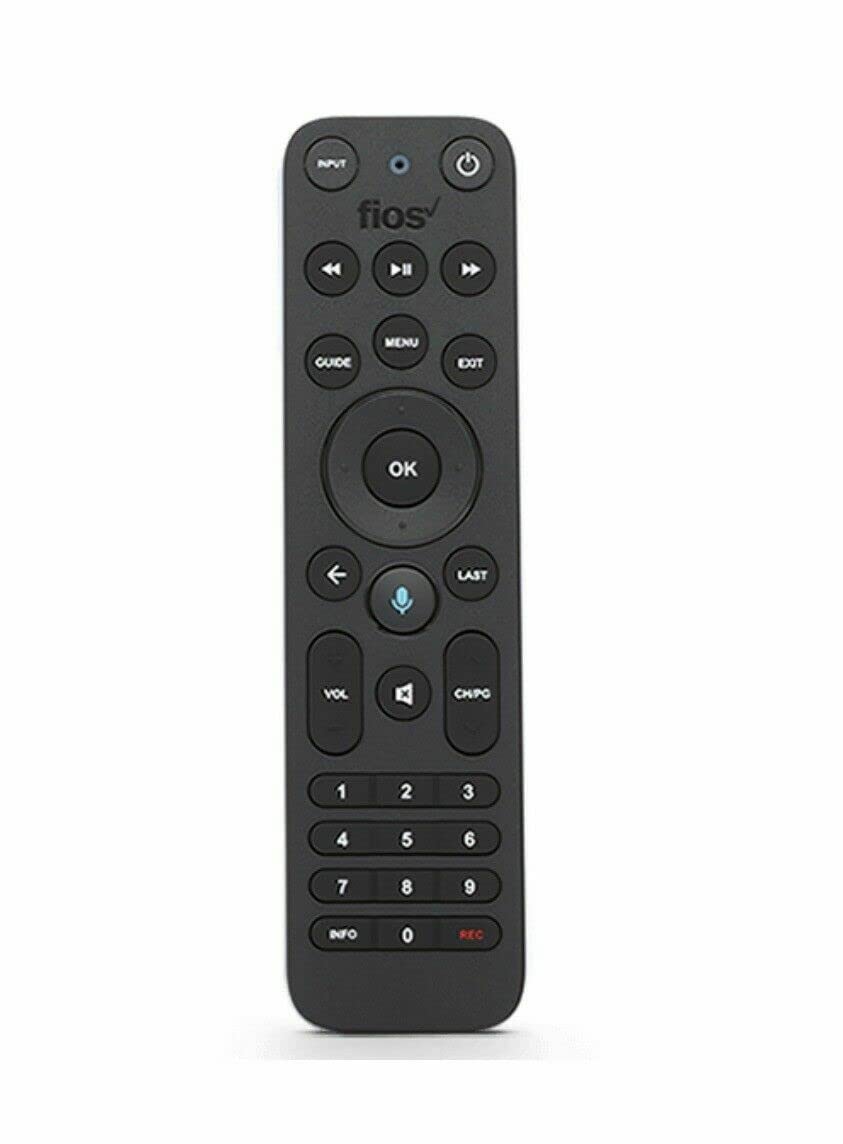
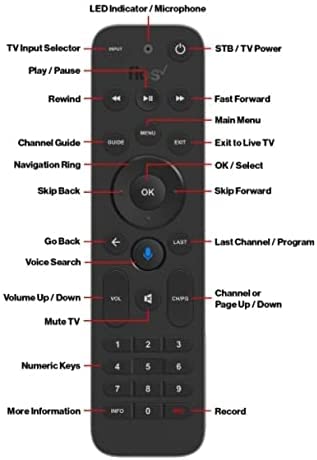
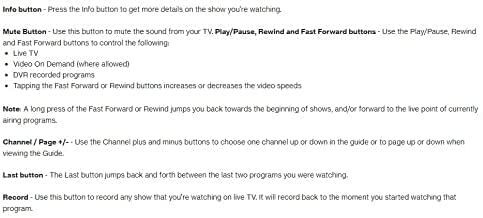
Voice search - The fastest way to use your Fios TV Voice Remote is by pressing and holding the Voice Search button to say what you want to watch. Just say what you’re looking for, like “What’s on tonight.” You may also find movies by naming your favorite actor, tune to a channel, turn on subtitles, access the Guide and much more! You can control your DVR or VOD playback by saying “Fast forward one minute” or “Rewind thirty seconds”. Just remember to hold the button down while speaking and then release. Menu - The Menu button takes you to the main on-screen menu. From there, use the ring surrounding the OK button on the Fios TV Voice Remote to move between menu options. Guide - The Guide button takes you directly to the programming grid guide. Pressing the Guide button again brings up a selector that allows you to choose another view. Navigation ring and OK/Select - Press the navigation ring segments for up, down left or right and the OK buttons to navigate and make onscreen selections. Using Navigation ring buttons to Skip Forward and Back- Press the Left and Right navigation ring segments to skip video forward or back while using the DVR or watching Video on Demand. Back (arrow) button - Go back to the previous screen. Exit button - The exit button will leave your current menu location or screen and return you to normal TV viewing. Info button - Press the Info button to get more details on the show you're watching. Mute Button - Use this button to mute the sound from your TV. Play/Pause, Rewind and Fast Forward buttons.
• ?? WIRELESS ACTIVATED LIGHT - The Fios TV Voice Remote connects with your Fios TV One via a wireless Bluetooth connection so it will still work if your Fios TV One is hidden in a cabinet or other non-metal enclosure-as long as it’s not farther than 25 feet away.
• ?? FIND MY REMOTE - If you misplace your Fios TV Voice Remote, press the power button on the Fios TV One twice. The Fios TV Voice Remote that’s paired with that Fios TV One will start making a beeping sound. When you find the Fios TV Voice Remote, press any button on the Fios TV Voice Remote to silence the beeping.
• ?? MOTION ACTIVATED LIGHT - There is a sensor on the back of your Fios TV Voice Remote that activates the Fios TV Voice Remote light when it detects motion-making it easier for you to see the Fios TV Voice Remote in the dark.
• ?? VOICE SEARCH - The fastest way to use your Fios TV Voice Remote is by pressing and holding the Voice Search button to say what you want to watch. Just say what you’re looking for, like “What’s on tonight.”
• ? DOES NOT WORK WITH FRONTIER. ? WORKS WITH VERIZON.
Model: 040003410550
Color: Black
Voice search - The fastest way to use your Fios TV Voice Remote is by pressing and holding the Voice Search button to say what you want to watch. Just say what you’re looking for, like “What’s on tonight.” You may also find movies by naming your favorite actor, tune to a channel, turn on subtitles, access the Guide and much more! You can control your DVR or VOD playback by saying “Fast forward one minute” or “Rewind thirty seconds”. Just remember to hold the button down while speaking and then release. Menu - The Menu button takes you to the main on-screen menu. From there, use the ring surrounding the OK button on the Fios TV Voice Remote to move between menu options. Guide - The Guide button takes you directly to the programming grid guide. Pressing the Guide button again brings up a selector that allows you to choose another view. Navigation ring and OK/Select - Press the navigation ring segments for up, down left or right and the OK buttons to navigate and make onscreen selections. Using Navigation ring buttons to Skip Forward and Back- Press the Left and Right navigation ring segments to skip video forward or back while using the DVR or watching Video on Demand. Back (arrow) button - Go back to the previous screen. Exit button - The exit button will leave your current menu location or screen and return you to normal TV viewing. Info button - Press the Info button to get more details on the show you're watching. Mute Button - Use this button to mute the sound from your TV. Play/Pause, Rewind and Fast Forward buttons.
• ?? WIRELESS ACTIVATED LIGHT - The Fios TV Voice Remote connects with your Fios TV One via a wireless Bluetooth connection so it will still work if your Fios TV One is hidden in a cabinet or other non-metal enclosure-as long as it’s not farther than 25 feet away.
• ?? FIND MY REMOTE - If you misplace your Fios TV Voice Remote, press the power button on the Fios TV One twice. The Fios TV Voice Remote that’s paired with that Fios TV One will start making a beeping sound. When you find the Fios TV Voice Remote, press any button on the Fios TV Voice Remote to silence the beeping.
• ?? MOTION ACTIVATED LIGHT - There is a sensor on the back of your Fios TV Voice Remote that activates the Fios TV Voice Remote light when it detects motion-making it easier for you to see the Fios TV Voice Remote in the dark.
• ?? VOICE SEARCH - The fastest way to use your Fios TV Voice Remote is by pressing and holding the Voice Search button to say what you want to watch. Just say what you’re looking for, like “What’s on tonight.”
• ? DOES NOT WORK WITH FRONTIER. ? WORKS WITH VERIZON.
Model: 040003410550
Color: Black
Additional Information
Delivery Information
Swift, Secure, and Reliable Shipping
At craftedyogi.com, we understand how important fast and dependable delivery is when it comes to your electronics. Whether it's a gadget, accessory, or device, we are committed to providing a seamless and efficient shipping experience to ensure your electronics arrive safely and on time.
Our Shipping Process
Order Processing
As soon as you place your order, our dedicated team begins processing it promptly to ensure quick dispatch. We aim to ship all electronics within 2 business days of order confirmation, excluding weekends and holidays.
Secure Packaging
Your electronics are valuable, and we treat them with the highest level of care. Each item is carefully packed using high-quality, protective packaging materials to prevent damage during transit. We ensure your products arrive in excellent condition, ready to use.
Shipping Partners
We partner with reputable and trusted shipping carriers to guarantee safe and timely delivery. Once your order ships, you’ll receive a tracking number so you can monitor your package in real time and stay updated on its delivery status.
Transit Time
USA Shipping: 4–7 business days after dispatch.
Shipping Costs
We Offer free shipping for Domestic orders inside USA.
Delivery Support
Our customer support team is here to assist you every step of the way. If you have any questions about your order, shipping timelines, or tracking details, please feel free to contact us:
📧 Email: support@craftedyogi.com
We’re dedicated to ensuring your electronics reach you quickly and securely. Your satisfaction is our top priority.
Thank you for choosing craftedyogi.com for your electronics needs. We look forward to delivering innovation and convenience right to your doorstep. Unbox with confidence and enjoy your new technology!
Reviews
My Wishlist
Wishlist is empty.
Compare
Shopping cart


